In this article, I'm assuming that we have the table below
| year | month | day | amount |
|---|---|---|---|
| 2022 | 1 | 1 | 1000 |
| 2022 | 1 | 2 | 1000 |
| 2022 | 2 | 1 | 1000 |
| 2022 | 2 | 2 | 1000 |
| 2023 | 1 | 1 | 1000 |
| 2023 | 1 | 2 | 1000 |
| 2023 | 2 | 1 | 1000 |
| 2023 | 2 | 2 | 1000 |
The data is partitioned on 3 columns - year, month, day.
Suppose you want to load sales data of 1 Jan 2023 from partitioned files in your storage, into a spark dataframe.
Now, we are looking at 2 scenarios:
- Files are stored such that spark recognizes partitions
- Files are stored such that spark doesn't recognize partitions
Standard and non-standard subdirectory formats
Hive partition subdirectory naming scheme
The partition storage format spark understands is the hive storage format. The partition folder names follow a specific format - <partition_column_name>=<partition_column_value>.
Suppose the sales data is partitioned on the columns - year, month and date.
If the saved data was partitioned by spark's data writer, the the folder structure will look something like this:
.
└── data
    └── sales
        ├── year=2022
        │   ├── month=1
        │   │   ├── day=1
        │   │   ├── day=2
        │   │   └── day=3
        │   └── month=2
        │       ├── day=1
        │       ├── day=2
        │       └── day=3
        └── year=2023
            ├── month=1
            │   ├── day=1
            │   ├── day=2
            │   └── day=3
            └── month=2
                ├── day=1
                ├── day=2
                └── day=3
While loading the data after specifying the /data/sales path, spark will automatically understand that data in this directory is partitioned, and recognize the columns on which it has been partitioned.
When spark understands what partitions are stored where, it will optimize partition reading. Here is how:
Reading files is a lazy operation. So spark won't read anything until needed.
Suppose you read the partitioned data into a dataframe, and then filter the dataframe on one of the partition columns. Now, the spark planner will recognize that some partitions are being filtered out. So, when it generates the physical plan, it will directly skip reading the files in partitions that are going to get filtered anyways. And it will know which files to skip because it exactly knows which folders have which partitions (because of the standard directory structure). This is a basic read-time optimization that the spark engine will do for you.
So, in your spark program, you'll just have to give the data path as /data/sales/. And then filter the dataframe on year=2023, month=1, date=1. The spark optimization engine will automatically load the sales records in the relevant folder (in this case, from /data/sales/year=2023/month=1/date=1)
Proof of partition-read skipping
Let's take an example
I will:
- Create a dataframe
- Write it using the DataFrameWriter, partitioned by year, month, day
- Read the written data using DataFrameReader
- Filter the dataframe on
year==2023(which is a partition key) - Look at the filtered dataframe output
- Look at the execution plan, to check if spark read all partitions, or only the partition I want
# ################################
# 1. Create a dataframe

data = [
(2022, 1, 1,1000),
(2022, 1, 2,1000),
(2022, 2, 1,1000),
(2022, 2, 2,1000),
(2023, 1, 1,1000),
(2023, 1, 2,1000),
(2023, 2, 1,1000),
(2023, 2, 2,1000),
]
schema = ["year","month","day", "amount"]
write_df = spark.createDataFrame(data=data, schema=schema)

# ################################
# 2. Write it using the DataFrameWriter, partitioned by year, month, day
(
    write_df.write
    .format("csv")
    .option("header", "true")
    .mode("overwrite")
    .partitionBy("year","month","day")
    .save("data/sales/")
)


# ################################
# 3. Read the written data using DataFrameReader
sales_df = (
            spark.read
            .format("csv")
            .option("basePath", "data/sales/")
            .option("header", "true")
            .load("data/sales/year=*/")
)
# ################################
# 4. Filter the dataframe on year==2023 (which is a partition key)
sales_df = sales_df.select("*").where(sales_df.year==2023)

# ################################
# 5. Look at the filtered output
sales_df.show()

# ################################
# 6. Look at the execution plan, to check if spark read all partitions, or only the partition I want
sales_df.explain(extended=True) # explain execution plan
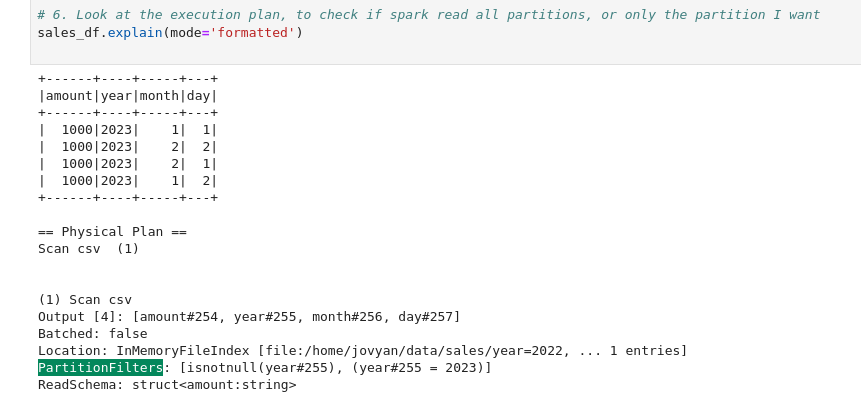
Here is the spark's generated plan for the sales_df. Notice the PartitionFilters list. You can see that it only loaded the partitions where year=2023. All other partitions were skipped in the read phase itself.
Non-hive partition subdirectory naming scheme
Here, the partitioned data files are in subfolders with non-standard names that spark doesn't understand.
Here is a format that you'll see most often:
.
└── data
    └── sales
        ├── 2022
        │   └── 1
        │       ├── 1
        │       ├── 2
        │       └── 3
        └── 2023
            └── 1
                ├── 1
                ├── 2
                └── 3
Spark won't understand the partition structure, as the filenames are not in the specific partition format that spark understands.
In this case, there is no way for spark to know that:
/2022is actually the directory of partitionyear=2022/2022/1is the directory of partitionyear=2022,month=1/2022/1/1is the directory of partitionyear=2022,month=1,day=1
So, spark won't understand which directory contains which partition.
Now suppose you only want data of the year=2022 in a dataframe. Now, spark doesn't know which directories contain data of the partition year=2022. So it will read all partitions, then filter the dataframe. It won't optimize and skip reading un-necessary partitions because it doesn't know which partition is stored where.
You cannot just give spark the base path, filter your dataframe on the partition key, and expect spark to optimize the reads. You'll have to optimize the reads yourself, manually, by providing specific paths.
For example, if you want to load data of year=2022, you'll have to manually give the loading directory path as /data/sales/2023/1/1/*.parquet.
More examples:
- Load all data - all years, months, days
/data/sales/*/*/*/*.parquet
- Load all data of entire year of 2023
/data/sales/2023/*/*/*.parquet
- Load all data of entire month of Jan
/data/sales/2023/1/*/*.parquet
- Load all data of 1 Jan 2023
/data/sales/2023/1/1/*.parquet
Notes
Partitioned columns are removed from the saved datafile
The partitioned columns are removed from the saved data file, as spark can take the column value from the directory's name itself.
Suppose spark is reading from the path /data/sales/2022/1/1/*.parquet*. In this case, spark will know that for the data loaded from these files - year=2023, month=1 and day=1.
Not all file formats support partition discovery
Formats that support partition discovery
- Csv
- Json
- ORC
- Parquet
Formats that don't support partition discovery
- Avro
Converting saved partitions to the hive subdirectory format that spark understands
Reference - stackoverflow answer
# ################################
# 1. read all sales data

sales_df = (
        spark.read
        .format("parquet")
        .option("header","true")
        .load("/data/sales/*/*/*/*.parquet")
)
# ################################
# 2. add a file_path column to dataframe

import pyspark.sql.functions as F
sales_df = sales_df.withColumn('file_path', F.input_file_name())

# ################################
# 3. create year, month, day columns using file path

import pyspark.sql.functions as F
# add a column to store the input file name
sales_df = sales_df.withColumn('file_path', F.input_file_name())
# create columns for year, month, day. Extract their values from the file_path column
sales_df = (
            sales_df
            .withColumn('year',  F.split(df['file_path'], '/').getItem(3))
            .withColumn('month', F.split(df['file_path'], '/').getItem(4))
            .withColumn('day',   F.split(df['file_path'], '/').getItem(5))
)

# ################################
# 4. Write data
(
    df.write
    .format("parquet")
    .option("header", "true")
    .mode("overwrite")
    .partitionBy("year","month","day")
    .save("data/sales/")
)
In this example I directly overwrote data/sales. Your mental sirens should have immediately gone off on that step.
What if the job fails midway during the overwrite? Now, I've partially corrupted the sales data (some directories are in new format, rest are in the old format, some partitions are missing). And we'll have to re-generate it from the bronze tables. It got extremely expensive and time consuming.
Instead of directly overwriting data, the safer process is -
- Write the data into a temporary_directory like
data/sales_fixed/. - Then if the operation was successful, then delete the data in the older
data/sales/directory - Rename
data/sales_fixed/todata/sales/
Never ever directly overwrite source data. Write output in an intermediate location. Then if the complete write was successful, then replace the source data with the intermediate data (rename the intermediate directory, or table)