CSVs are ubiquitous. You'll find them everywhere.
Read CSV
The barebones read method template is:
sales_df = (
    spark
    .read
    .format("csv") # set data type format
    .load("/data/sales/") # set load location
)
i
Note: Instead of using format().load() to set the data format type and data location, you can directly use the format-specific csv() to set both data format and location through a single method.
sales_df = (
    spark
    .read
    .csv("/data/sales/")
)
However, it is recommended that you stick to using the standard template of .format().load(). It keeps your codebase more uniform.
In this article, I'm sticking to the .format().load() way of loading csv.
A more practical read command will:
- Set column names from the csv files' header
- Automatically infer schema from loaded data (schema on read)
sales_df = (
    spark
    .read
    .format("csv")
    .option("header", "true")
    .option("inferschema", "true") # optional option
    .load("/data/sales/")
)
Find all read options for CSV at - CSV data source options documentation
Set schema of the loaded dataframe
Infer schema is not always accurate. Sometimes, you simply know your data better than the spark engine. In this case, set the dataframe's schema manually.
Keep in mind that you're defining the schema of the dataframe (the data that has been loaded into the dataframe). You aren't defining the schema of the source file.
Automatically set schema using the inferSchema option
sales_df = (
    spark
    .read
    .format("csv")
    .option("header", "true")
    .option("inferschema", "true") # optional option
    .load("/data/sales/")
)
Manually set schema
There are 2 ways to set schema manually:
- Using DDL string
- Programmatically, using
StructTypeandStructField
Set schema using DDL string
This is the recommended way to define schema, as it is the easier and more readable option. These datatypes we use in the string are the Spark SQL datatypes.
The format is simple. It is a string-csv of the dataframe's every column name & datatype.
schema_ddl_string = "<column_name> <data type>, <column_name> <data type>, <column_name> <data type>"
sales_schema_ddl = """year INT, month INT, day INT, amount DECIMAL"""

sales_df = (
    spark
    .read
    .format("csv")
    .schema(sales_schema_ddl) # set schema
    .option("header", "true")
    .load("/data/sales/")
)
The datatypes you can use for DDL string are:
| Data type | SQL name |
|---|---|
| BooleanType | BOOLEAN |
| ByteType | BYTE, TINYINT |
| ShortType | SHORT, SMALLINT |
| IntegerType | INT, INTEGER |
| LongType | LONG, BIGINT |
| FloatType | FLOAT, REAL |
| DoubleType | DOUBLE |
| DateType | DATE |
| TimestampType | TIMESTAMP, TIMESTAMP_LTZ |
| TimestampNTZType | TIMESTAMP_NTZ |
| StringType | STRING |
| BinaryType | BINARY |
| DecimalType | DECIMAL, DEC, NUMERIC |
| YearMonthIntervalType | INTERVAL YEAR, INTERVAL YEAR TO MONTH, INTERVAL MONTH |
| DayTimeIntervalType | INTERVAL DAY, INTERVAL DAY TO HOUR, INTERVAL DAY TO MINUTE, INTERVAL DAY TO SECOND, INTERVAL HOUR, INTERVAL HOUR TO MINUTE, INTERVAL HOUR TO SECOND, INTERVAL MINUTE, INTERVAL MINUTE TO SECOND, INTERVAL SECOND |
| ArrayType | ARRAY |
| StructType | STRUCT Note: ‘:’ is optional. |
| MapType | MAP |
Source - Spark SQL - Supported Data Types
Set schema programmatically, using python api functions
We define a column's datatype using the StructField() method.
To define the schema of the entire dataframe, we -
- Create a StructField("column_name", DataType()) that defines datatype of one column of the dataframe
- Create a list of StructField(), to define the data type of every column in the dataframe
- Pass list of StructFields into a StructType()
- Pass the StructType() object to the schema() method of DataFrameReader.read
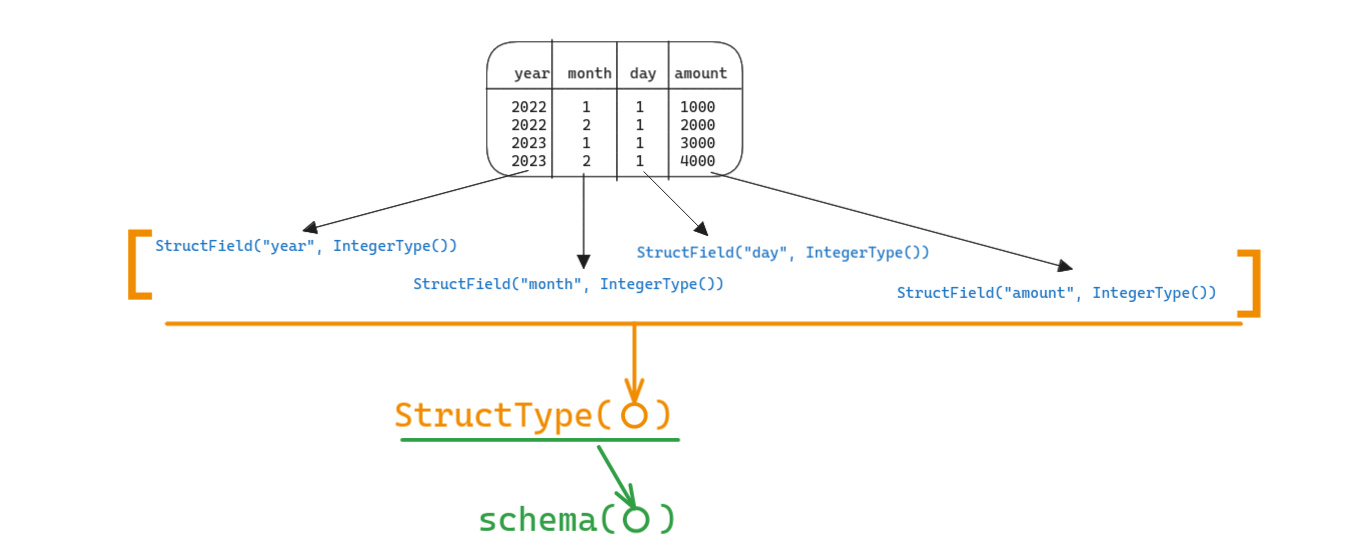
It looks easier if you directly look at the code:
sales_schema_struct = StructType(
    [
        StructField("year", IntegerType()),
        StructField("month", IntegerType()),
        StructField("day", IntegerType()),
        StructField("amount", DecimalType()),
    ]
)

sales_df = (
    spark
    .read.format("csv")
    .schema(sales_schema_struct)  # set schema
    .option("header", "true")
    .load("/data/sales/")
)
The datatypes you can use in StructField() are:
| Data type | Value type in Python | API to access or create a data type |
|---|---|---|
| ByteType | int or long Note: Numbers will be converted to 1-byte signed integer numbers at runtime. Please make sure that numbers are within the range of -128 to 127. |
ByteType() |
| ShortType | int or long Note: Numbers will be converted to 2-byte signed integer numbers at runtime. Please make sure that numbers are within the range of -32768 to 32767. |
ShortType() |
| IntegerType | int or long | IntegerType() |
| LongType | long Note: Numbers will be converted to 8-byte signed integer numbers at runtime. Please make sure that numbers are within the range of -9223372036854775808 to 9223372036854775807. Otherwise, please convert data to decimal.Decimal and use DecimalType. |
LongType() |
| FloatType | float Note: Numbers will be converted to 4-byte single-precision floating point numbers at runtime. |
FloatType() |
| DoubleType | float | DoubleType() |
| DecimalType | decimal.Decimal | DecimalType() |
| StringType | string | StringType() |
| BinaryType | bytearray | BinaryType() |
| BooleanType | bool | BooleanType() |
| TimestampType | datetime.datetime | TimestampType() |
| TimestampNTZType | datetime.datetime | TimestampNTZType() |
| DateType | datetime.date | DateType() |
| DayTimeIntervalType | datetime.timedelta | DayTimeIntervalType() |
| ArrayType | list, tuple, or array | ArrayType(elementType, [containsNull]) Note:The default value of containsNull is True. |
| MapType | dict | MapType(keyType, valueType, [valueContainsNull]) Note:The default value of valueContainsNull is True. |
| StructType | list or tuple | StructType(fields) Note: fields is a Seq of StructFields. Also, two fields with the same name are not allowed. |
| StructField | The value type in Python of the data type of this field (For example, Int for a StructField with the data type IntegerType) |
StructField(name, dataType, [nullable]) Note: The default value of nullable is True. |
Source - Spark SQL - Supported Data Types
Write CSV
The barebones write method template is:
sales_df.write.format("csv").save("/data/sales")
A more practical write command will:
- save column names into the file's header
- set compression (default compression is null)
(
    sales_df
    .write
    .format("csv")
    .option("header", "true")
    .option("compression", "snappy")
    .mode("overwrite")
    .save("/data/sales")
)
Partition written data on specific columns
To make reading data faster and more optimized, by increasing parallelization.
Eg - Partition by year, month, date:
(
    sales_df
    .write
    .format("csv")
    .option("header", "true")
    .option("compression", "snappy")
    .mode("overwrite")
    .partitionBy("year", "date", "day")
    .save("/data/sales")
)
Bucket written data on specific columns
To break down the file sizes within each partition.
Eg - Create 10 buckets within each partition:
(
    sales_df
    .write
    .format("csv")
    .option("header", "true")
    .option("compression", "snappy")
    .mode("overwrite")
    .bucketBy(10, "year", "date", "day")
    .save("/data/sales")
)
More details in bucketBy() documentation
That's it. Enjoy.23